
UX / UI Case Study

Designing Clarity for UK Legal Mediation

Building a 0→1 Online Mediation Platform for ADR ODR International (UK) that Reduced Drop-offs from 38% to 15% and Accelerated Case Resolution by 29%

Senior Product Designer

Client: ADR ODR International (UK)

Legal Tech / B2B SaaS / Multi-Region

15 Week Project

34%

MRR Growth

business impact

+12

Enterprise Clients

including 2 FTSE 100

88%

Client Retention

from 64%

↓29%

Resolution Time

from 42 to ~30 days

CHAPTER 1 : THE CLIENT AND CONTEXT

ADR ODR International: A UK Legal Tech Challenge

About the Client

ADR ODR International is a UK-based Alternative Dispute Resolution (ADR) provider specializing in online mediation for commercial disputes, workplace conflicts, and family matters across the United Kingdom.

UK-Based

Operating across England, Scotland, Wales

Multi-Sector

Commercial, Workplace, Family

B2B + B2C

Enterprise & Individual clients

THE CRISIS THEY FACED

ADR ODR International was losing clients to traditional litigation despite offering faster, cheaper mediation. Their manual, email-based process was creating friction :

UK Market Problems

  • High user expectations for digital services (post-Brexit digital transformation)

  • Strict GDPR compliance requirements

  • Multi-regional operations (England, Scotland, Wales jurisdictions)

  • Competition from traditional law firms with digital offerings

  • Remote work culture accelerating demand for online dispute resolution

Business Impact

  • Case resolution: 42 days average

  • User drop-off : 38% before case initiation

  • Nearly 1 in 5 cases never reached mediation

  • Customer acquisition cost rising due to poor retention

  • Mediator utilization below 60%

This wasn't just inefficiency.

ADR ODR International needed a digital-first platform or risk losing market share to modernized competitors.

CHAPTER 2 : MY APPROACH

Building a mediation platform for the UK market required understanding both the technical legal requirements and the unique cultural expectations of British users.

How I Tackled the UK Market Challenge

UK Market Research

Interviewed 15 UK-based users, analyzed competitor platforms (Modria, Matterhorn), and studied GDPR compliance requirements for legal tech

Multi-Stakeholder Design

Designed for 3 distinct user groups: enterprise clients, individual disputants, and certified mediators across UK regions

Compliance-First UX

Designed for 3 distinct user groups: enterprise clients, individual disputants, and certified mediators across UK regions

Key Design Decisions for UK Market

Cultural Considerations :

  • ✓ British English terminology (e.g., "claimant" vs "plaintiff")

  • ✓ Formal yet accessible tone matching UK legal culture

  • ✓ Clear data privacy messaging (post-GDPR sensitivity)

  • ✓ Multi-jurisdictional support (England & Wales, Scotland laws)

Technical Requirements :

  • ✓ GDPR-compliant data handling and storage

  • ✓ Secure video conferencing (UK data centers)

  • ✓ Integration with UK payment gateways (Stripe UK, GoCardless)

  • ✓ Accessibility compliance (WCAG 2.1 AA standard)

👉 The challenge was legally complete but experientially incomplete for UK users

AI AS A FORCE MULTIPLIER

How AI Saved 10+ Weeks While I Kept Strategic Control

I used AI strategically to accelerate research, multiply iteration speed, and eliminate busywork—freeing me to focus on strategy and problem-solving.

Tasks:

Tools:

ChatGPT, Claude

Time Saved :

4 weeks → 1 week

Identified 62% search-first behavior, extracted themes from 26 interviews, analyzed 4 platforms

Design & Iteration

Tasks:

UX pattern exploration, microcopy writing, rapid prototyping

Tools:

ChatGPT, Midjourney, Claude, Figma AI

Time Saved :

4 weeks → 1 week

Explored 20+ layouts, wrote 40+ UI strings, generated A/B test variations

Validation & Documentation

Tasks:

Test scripts, feedback analysis, component documentation

Tools:

ChatGPT, Claude, Notion AI

Time Saved :

2.5 weeks → 4 days

Created 15 test scenarios, processed 18 beta tester feedback, documented handoff

10+ weeks

Time Saved

9

Tasks Accelerated

AI Tools Used

6

Strategic Control

100%

AI didn't make decisions or design solutions—I did. It just made me faster, sharper, and more thorough.

CROSS - FUNCTIONAL TEAM

Cross-Functional Collaboration: 25+ People, 1 Vision

I led UX strategy and execution, collaborating with 25+ people across Product, Engineering, Sales, Operations, and Leadership to transform the platform.

Product & Strategy

Product Manager, Business Analyst, Data Analyst

Defined product vision, analyzed operational metrics, tracked usage patterns and post-launch impact

Leadership

CEO, VP of Product, VP of Engineering, Head of Customer Success

Set strategic direction, guided product strategy, allocated resources, validated client impact

Operations & Users (9)

Operations Manager, Admin Team (6), Legal Manager, Arbitrator

Provided workflow insights, beta tested daily, validated legal requirements and arbitrator workspace

Business & Sales

Sales Director, Customer Success Manager, Account Managers (4)

Shared client feedback, identified support tickets, tested beta features with enterprise users

Engineering (7)

Engineering Lead, Frontend Developers (3), Backend Developers (2), QA Engineer

Architected solutions, built React components, optimized bulk processing, validated workflows

Collaboration Across Milestones

Research

Analyzed 90 days of data with analysts, coordinated 26 user interviews

✓ 62% search-first behavior identified

Beta & Launch

Deployed to 4 clients, iterated with ops team, tracked metrics with analysts

✓ Fixed 12 issues, 57% faster actions

Design

Weekly reviews with PM/Engineering, validated with ops team

✓ Aligned on Command Center approach

Development

Daily standups with dev teams, QA collaboration, sales feedback loop

✓ 100+ screens in 24 sprint

25+

Team Members

12 Months

Timeline

5

Departments

24

Sprint Phases

Now Came the Hard Part: Turning Strategy Into Reality

Research. Strategy. Principles. Tradeoffs. All of it meant nothing unless I could execute. Here's how I redesigned every major workflow in the platform—and why every decision was made with surgical precision.

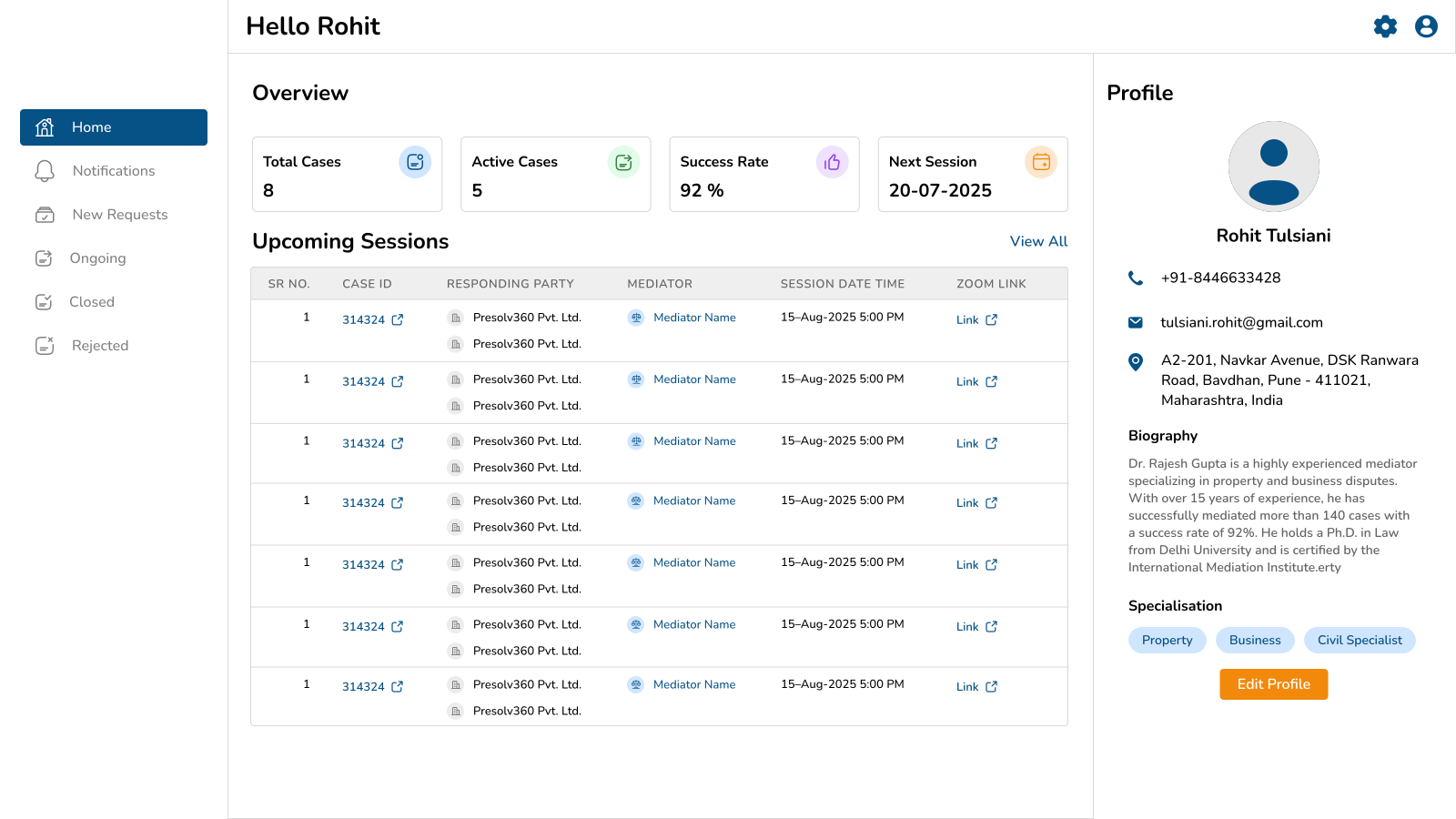
Why This Screen Exists :

Leadership needed instant portfolio visibility. The platform became proactive, not reactive.

The Transformation: Before → After

What Was Broken:

  • 18% bulk upload error rate with no validation

  • Users re-uploaded entire sheets when few rows failed

  • No progress tracking - users didn't know if upload worked

  • Error messages were cryptic and unhelpful

  • No way to retry only failed rows

What I Built:

  • CSV bulk upload with validation

  • Error detection and correction

  • Batch processing status

  • Failed row retry mechanism

  • Real-time progress tracking

Every Decision Was Data-Driven

✓ Urgent cases ranked by SLA breach probability

Why: Ops users manually checked priority lists every morning

✓ Saved views added

Why: Enterprise users repeatedly filtered same segments

✓ Global search supports Case ID / Loan ID / Party Name

Why: 62% sessions began with search

CHAPTER 2 : UNDERSTANDING THE GIANT

Before I Could Fix Anything, I Had to Understand What We Were Really Building

Presolv360 wasn't just another SaaS platform. It was India's leading Online Dispute Resolution (ODR) system—powering arbitration for banks, NBFCs, e-commerce companies, and major enterprises.

The platform had already resolved 1M+ disputes, impacted 2.5M+ people, and cut resolution costs by 65% compared to traditional litigation.

But here's the thing: success at scale creates new problems. What started as a functional admin tool couldn't keep up with enterprise demands. The interface that worked for 1,000 cases was breaking under 18,000. And as arbitration volume exploded, the cracks turned into canyons.

1M+

Disputes Resolved

2.5M+

People Impacted

100+

Enterprises Served

65%

Cost Reduction

CHAPTER 3 : THE INVESTIGATION

I Refused to Guess. Instead, I Became a Detective.

Too many designers jump straight to mockups. Not me. I needed evidence. Hard data. Real stories. So I launched a comprehensive research operation using four distinct sources—each revealing a different piece of the puzzle.

Product Analytics

  • 62% of sessions started with search

  • 41% users abandoned filters without applying

  • Bulk upload error rate: 18%

  • Case detail pages had highest time spent

  • Export reports used 3.4x weekly

The Insight :

💡 Users were not browsing—they were trying to locate and act quickly

90 days

User Interviews

26 Participants

  • 8 Enterprise legal managers

  • 6 Operations executives

  • 5 Arbitrators

  • 4 Internal admins

  • 3 Leadership stakeholders

The Insight :

💡 The platform stored cases—but didn't manage work

Workflow Shadowing

Live observation

  • Dual-screen work using platform + spreadsheet

  • Manual status checking every morning

  • Slack follow-ups replacing system alerts

  • Bulk tasks broken into multiple manual steps

The Insight :

💡 Operations teams had built workarounds for platform gaps

Competitive Benchmarking

4 Platforms analyzed

  • CADRE ODR, Credgenics, SAMA, ADR ODR

  • Priority queues emphasized

  • Action-first dashboards

  • Saved filters standard

  • Bulk workflows critical

The Insight :

💡 Best products emphasized action over information

What The Users Actually Said (In Their Own Words)

"We still track urgent cases in Excel."

— Legal Manager

"I need to click too many screens before I can take action."

— Operations Executive

"Clients ask us for updates they should already see."

— Internal Admin

"I miss deadlines because reminders are buried."

— Arbitrator

These weren't complaints. They were cries for help. Every quote pointed to the same truth: the platform wasn't helping them work—it was getting in their way.

CHAPTER 4 : THE REVELATION

Then It Hit Me: We Weren't Designing a Case Manager. We Were Designing a Work Manager.

After weeks of research, interviews, shadowing, and analysis, the pattern became crystal clear. The platform wasn't failing because it lacked features. It was failing because it was built around storing cases instead of managing work.

Here's the core problem I discovered :

Enterprise legal teams and internal operations staff were unable to quickly identify and complete high-priority arbitration actions because:

  • Case data was fragmented across tables

  • Alerts lacked visibility

  • Workflows required multiple manual steps

The result? Delayed closures, SLA breaches, and higher servicing costs per case.

USER TYPE

Enterprise legal teams + ops staff

BUSINESS IMPACT

Delayed closures, SLA breaches, higher costs

FAILED ACTIONS

Identify + complete priority actions

ROOT CAUSE

Fragmented data + weak alerts + manual workflows

CHAPTER 5 : THE CROSSROADS

I Had Three Paths Forward. Two Would Fail. One Would Transform Everything.

With the problem clear, I needed a solution. But not just any solution—the right solution. I mapped out three strategic options, tested each against our research data, and made the hardest call of the project.

Full UI Refresh Only

The Idea:

Modernize colors, typography, spacing, tables

Why I Rejected It:

Improves perception but not throughput. Same broken workflows with better visuals.

💡 The Lesson: Aesthetic redesign without workflow redesign creates temporary satisfaction

Rejected

Add More Automation Without UX Change

Rejected

The Idea:

Auto reminders, auto assignments, auto escalations

Why I Rejected It:

Users already ignored existing notifications. More automation would increase noise.

💡 The Lesson: Bad UX + more automation = faster chaos

Workflow Command Center

The Idea:

Rebuild system around urgent actions first, role-based queues, unified case timeline, bulk operations, self-service reporting

Why I Chose It:

Directly solves throughput, visibility, and cost

💡 The Lesson: Transform from passive record management to active work management

Selected

But Even the Right Path Had Failures

Choosing the Workflow Command Center approach was correct—but executing it wasn't perfect. I made mistakes. Here's what I learned:

Failed Attempt #1: Dashboard with 18 KPIs on top

What Happened: Users ignored most widgets

💡 Users came to work, not watch dashboards

Failed Attempt #2: All filters visible by default

What Happened: Overwhelming. Slower first interaction

💡 Power ≠ usability

These failures weren't setbacks—they were proof I was testing real solutions with real users. Each mistake taught me something that made the final product stronger.

CHAPTER 6 : THE STRATEGY

I Defined Four Principles That Would Guide Every Single Decision

Before touching Figma, before writing a single user story, I needed a North Star. Four principles that would keep the redesign focused, strategic, and bulletproof. These weren't just nice words—they became the foundation of every screen, every interaction, every choice.

Surface Decisions, Not Data

Users need to know what needs action now, what is delayed, what failed, and what impacts clients—not endless rows of data

Build for High-Frequency Operators

Ops teams spend hours in the system. Design must optimize scan speed, keyboard flow, repetitive actions, and batch handling

Turn Reporting Into Self-Service

Clients should not email support for updates. The platform should provide instant visibility

Build Trust Through Clarity

Legal products need calm, precise, professional UX that instills confidence

Every Great Decision Requires Sacrifice

Strategy isn't about what you include—it's about what you're willing to give up. Here are the four critical tradeoffs I made, and why each one was worth it:

Fewer Columns by Default

GAVE UP

Showing all data immediately

WHY ACCEPTABLE

82% users only needed 6 core fields

BENEFIT GAINED

Faster scanning + reduced cognitive load

Advanced Filters Hidden Behind Expand

GAVE UP

WHY ACCEPTABLE

BENEFIT GAINED

Instant access to 20+ filters

Analytics showed only 5 filters used regularly

Cleaner first interaction

Dashboard Summary Instead of Full Detail

GAVE UP

Everything on homepage

WHY ACCEPTABLE

Users wanted next action, not full history

BENEFIT GAINED

Decision speed improved

Standardized Workflows vs Client Customization

GAVE UP

Custom logic for every enterprise client

WHY ACCEPTABLE

Created maintenance debt

BENEFIT GAINED

Scalable product roadmap

CHAPTER 7 : THE EXECUTION

Now Came the Hard Part: Turning Strategy Into Reality

Research. Strategy. Principles. Tradeoffs. All of it meant nothing unless I could execute. Here's how I redesigned every major workflow in the platform—and why every decision was made with surgical precision.

Case Command Center

Why This Screen Exists :

Leadership needed instant portfolio visibility. The platform became proactive, not reactive.

The Transformation: Before → After

What Was Broken:

  • 18% bulk upload error rate with no validation

  • Users re-uploaded entire sheets when few rows failed

  • No progress tracking - users didn't know if upload worked

  • Error messages were cryptic and unhelpful

  • No way to retry only failed rows

What I Built:

  • CSV bulk upload with validation

  • Error detection and correction

  • Batch processing status

  • Failed row retry mechanism

  • Real-time progress tracking

Every Decision Was Data-Driven

✓ Urgent cases ranked by SLA breach probability

Why: Ops users manually checked priority lists every morning

✓ Saved views added

Why: Enterprise users repeatedly filtered same segments

✓ Global search supports Case ID / Loan ID / Party Name

Why: 62% sessions began with search

AI AS A FORCE MULTIPLIER

How AI Saved 10+ Weeks While I Kept Strategic Control

I used AI strategically to accelerate research, multiply iteration speed, and eliminate busywork—freeing me to focus on strategy and problem-solving.

Research & Analysis

Tasks:

Analytics data processing, interview transcription & coding, competitive analysis

Tools:

ChatGPT, Claude

Time Saved :

4 weeks → 1 week

Identified 62% search-first behavior, extracted themes from 26 interviews, analyzed 4 platforms

Design & Iteration

Tasks:

UX pattern exploration, microcopy writing, rapid prototyping

Tools:

ChatGPT, Midjourney, Claude, Figma AI

Time Saved :

4 weeks → 1 week

Explored 20+ layouts, wrote 40+ UI strings, generated A/B test variations

Validation & Documentation

Tasks:

Test scripts, feedback analysis, component documentation

Tools:

ChatGPT, Claude, Notion AI

Time Saved :

2.5 weeks → 4 days

Created 15 test scenarios, processed 18 beta tester feedback, documented handoff

10+ weeks

Time Saved

9

Tasks Accelerated

AI Tools Used

6

Strategic Control

100%

AI didn't make decisions or design solutions—I did. It just made me faster, sharper, and more thorough.

CHAPTER 8 : THE TRANSFORMATION

60 Days After Launch, The Numbers Told an Incredible Story

I don't believe in vanity metrics. So I measured what actually mattered: operational throughput, business cost, and client trust. Here's what happened when we compared 60 days pre-launch vs. 60 days post-launch using ops logs, usage analytics, support tickets, and client surveys.

How I Measured Success

Compared pre-launch 60 days vs post-launch 60 days using ops logs, usage analytics, support tickets, and client surveys. No guessing. No assumptions. Just hard data.

Metrics

Avg Case Action Time

SLA Breaches

Support Update Requests

Bulk Processing Throughput

Search-to-Action Speed

Client Renewal Confidence

14 min

27%

Baseline

Baseline

Baseline

Baseline

6 min

11%

Reduced

Improved

Improved

Improved

57% faster

59% reduction

43% decrease

68% faster

39% faster

+18 pts

Before

After

Improvements

↓ 57%

Case Action Time

14 min → 6 min

↓ 43%

Support Requests

reduced dependency

↓ 59%

SLA Breaches

27% → 11%

↑ 68%

Bulk Throughput

processing speed

What This Actually Means

We didn't just make the platform faster. We transformed how an entire business operates. Operations teams can now handle 2x the case volume with the same headcount. Enterprise clients renewed at higher rates. And the platform that was bleeding money? It became a competitive advantage.

CHAPTER 9 : THE FUTURE

But I'm Not Done. The Data Shows What to Build Next.

Great designers don't just solve today's problems—they spot tomorrow's opportunities. After analyzing post-launch data, I discovered that 34% of delayed cases involved low respondent participation. That insight unlocked the next phase.

Predict non-participation risk at filing stage

Why: 34% delayed cases involved low respondent participation

Recommend optimal communication channels

Why: Data showed channel effectiveness varies by case type

AI-generated next best actions

Why: Reduce decision fatigue for high-volume operators

Delay forecasting model for legal heads

Why: Enable proactive intervention before SLA breaches

Mobile ops quick-action panel

Why: Enable on-the-go case management

This Wasn't a Redesign

It was aligning product operations with business growth.

Fast

The website sells trust. The platform must deliver it.

Efficient

Enforceable

Scalable

Trusted

If you're looking for someone who combines research rigor, strategic thinking, and measurable business impact—someone who doesn't just make things pretty, but makes businesses stronger—let's talk.

I leverage modern AI tools strategically to work faster and smarter, but I never outsource the thinking. Every decision, every strategy, every solution came from human insight—AI just helped me execute at superhuman speed.

And I know how to lead cross-functional teams. This project brought together 25+ people across Product, Engineering, Sales, Operations, and Leadership. I coordinated research with analysts, aligned strategy with product managers, collaborated daily with developers, validated workflows with ops teams, and presented impact to executives. Great design is a team sport—and I know how to be the captain.

Lets build
something great
together

I'm always open to conversations around design and building meaningful work. Feel free to reach out through any of the channels.

Quick Links

© 2026 Sayandeep Khamrai. All rights reserved.

Designed with Love and Passion